WordPress powers over 40% of websites worldwide, making it the most widely used content management system today. From personal blogs and startup websites to business portals and eCommerce stores, WordPress is trusted because it is flexible, scalable, and easy to manage. However, while building a website with WordPress is relatively straightforward, choosing the right hosting for it is where many users get confused.
Choosing the wrong hosting can create serious issues. Your website may load slowly, struggle during traffic spikes, face frequent downtime, or become more vulnerable to security problems. Poor hosting can also affect SEO performance, because search engines prefer websites that load quickly, remain accessible, and offer a better user experience. In other words, even if your website design and content are excellent, weak hosting can still hold your online presence back. That is why understanding the basics of WordPress hosting is so important.
In this wordpress hosting guide, we will answer the 5 most frequently asked WordPress hosting questions in a clear, practical, and easy-to-understand way. This wordpress hosting guide article is written for beginners, business owners, bloggers, and anyone who wants to understand WordPress hosting better without getting lost in technical jargon.
What Is WordPress Hosting?
WordPress hosting is a type of web hosting environment that is configured to run WordPress websites efficiently. In simple terms, it is hosting that is optimized for the technical requirements of WordPress, so the platform performs better, remains more secure, and is easier to manage.
Although WordPress can technically run on many different types of hosting, WordPress hosting is designed to provide settings and features that support the CMS more effectively. This often includes server configurations that improve loading speed, caching tools that reduce resource usage, security settings that help protect WordPress sites, and support teams that are familiar with common WordPress-related issues.
A typical WordPress hosting environment may include:
- Server settings tuned for WordPress performance
- Built-in or compatible caching support
- Better database handling for WordPress websites
- Security rules focused on WordPress vulnerabilities
- One-click WordPress installation
- Automatic updates or update support
- Backup options and restoration tools
The reason WordPress hosting matters is because WordPress relies on PHP, MySQL, themes, plugins, and media files. All of these need a reliable hosting setup to function smoothly. A poorly configured hosting environment can make the site slow, unstable, or difficult to manage.
Many beginners assume that all hosting is the same, but that is not true. Some hosting setups are very general, while others are built to support specific platforms better. For example, a good Linux web hosting environment is often a practical starting point for WordPress because WordPress typically performs very well on Linux-based servers.
Do You Really Need WordPress Hosting?
This is one of the most common questions, especially among beginners who are launching their first website. The honest answer is that WordPress can run on many kinds of hosting, so in a strict technical sense, no, you do not always need hosting that is specifically labeled as WordPress hosting. However, choosing a hosting environment that works well with WordPress can make a big difference in real-world performance and ease of use.
If your website is small and simple, a basic hosting plan may work in the beginning. But as soon as you start caring about loading speed, uptime, plugin performance, security, backups, and SEO, the quality of your hosting becomes much more important.
Optimized hosting gives clear benefits, such as:
- Faster website speed
- Better server stability
- Easier WordPress setup and management
- Improved compatibility with plugins and themes
- Better security handling
- Smoother scaling as traffic grows
A lot of beginners make the mistake of choosing the cheapest hosting available, assuming they can figure everything out later. But poor hosting often creates more problems than it saves money. Slow dashboards, delayed page loads, server timeouts, update issues, and weak support can quickly become frustrating.
This does not mean everyone needs a premium or high-resource plan on day one. It simply means you should choose hosting that matches WordPress properly and can support your website goals. If your traffic is low and your site is new, a good shared hosting plan is usually enough. If you expect growth, more control, or better performance, you may need a stronger setup later.
What Is the Difference Between Shared, VPS, and Dedicated Hosting?
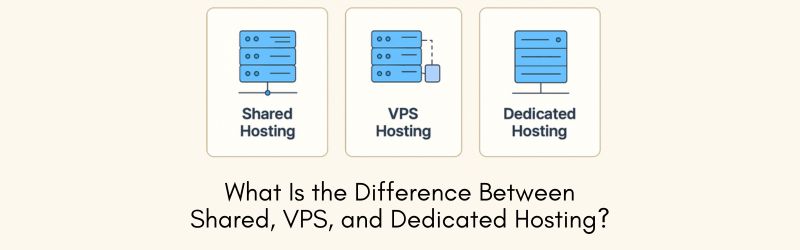
This is probably the most important question for anyone trying to choose the right hosting for a WordPress website. Shared hosting, VPS hosting, and dedicated hosting all serve different needs, and understanding the difference helps you avoid overpaying or underpowering your site.
Shared Hosting
Shared hosting is the most beginner-friendly and cost-effective option. In this setup, multiple websites share the same server resources, including CPU, RAM, and storage environment. Because the server is shared among many users, the cost is lower, which makes it attractive for startups, small businesses, blogs, and low-traffic sites.
Shared hosting is suitable when:
- You are launching a new website
- Your traffic is still low
- Your budget is limited
- You do not need advanced server control
- Your website is relatively simple
The main advantages of shared hosting are affordability and ease of use. It is usually managed, simple to set up, and does not require deep technical knowledge.
However, it also has limitations. Since resources are shared, the performance of your site can be affected by other websites on the same server. If traffic grows or your website becomes resource-heavy, shared hosting may start to feel restrictive.
VPS Hosting
VPS stands for Virtual Private Server. A VPS hosting environment is still part of a physical server, but it provides isolated resources to your website or application. That means you get a dedicated share of CPU, RAM, and storage performance, offering better stability and control compared to shared hosting.
A Virtual Private Server is often the next logical step when a website starts growing and shared hosting is no longer enough.
VPS hosting is suitable when:
- Your website is getting more traffic
- You want more speed and performance
- You need better resource allocation
- You want greater control over your server environment
- You host multiple websites or heavier WordPress installs
The major benefit of VPS hosting is that it gives you better performance without the full cost of a dedicated server. It is a great balance between affordability and power.
Dedicated Hosting
Dedicated hosting gives you an entire physical server for your own use. No shared resources, no neighboring websites consuming your server power. This type of hosting is designed for high-traffic websites, large applications, resource-heavy platforms, or businesses that require maximum control and performance.
Dedicated hosting is suitable when:
- Your website gets high traffic
- You need top-level performance
- You want full server customization
- You run large databases, custom applications, or multiple major websites
- Security and control are a high priority
The biggest strength of dedicated hosting is complete control and strong performance. However, it is also the most expensive option and may require more technical management, depending on the setup.
Which One Should You Choose?
- Choose shared hosting if you are a beginner or running a small website
- Choose VPS hosting if your website is growing and you need better speed and flexibility
- Choose dedicated hosting if you need full power, high customization, and maximum performance
The right choice depends on your website size, traffic level, budget, and future growth plans.
How Important Is Website Speed for WordPress Hosting?
Website speed is extremely important. In fact, speed is one of the biggest reasons hosting matters in the first place. A fast website improves user experience, builds trust, supports SEO, and increases the likelihood that visitors will stay on your site and take action.
When a website is slow, users notice immediately. Pages take longer to load, navigation feels frustrating, and visitors often leave before even reading the content. This increases bounce rates and reduces engagement. For business websites, it can also mean fewer inquiries, fewer leads, and fewer sales.
From an SEO point of view, website speed matters because search engines want to show users pages that deliver a better experience. A slow-loading site may struggle to perform competitively, especially when other websites in the same niche are faster and more stable.
Good hosting supports website speed in several ways:
- Faster server response time
- Better handling of PHP and database requests
- Improved caching compatibility
- More stable performance during traffic spikes
- Better resource allocation
Many WordPress site owners focus heavily on themes, plugins, and content optimization, which is good, but forget that the hosting environment is the base layer of performance. Even if you optimize images and install caching tools, weak hosting can still slow everything down.
Website speed also matters because WordPress often uses themes, page builders, plugins, media files, and database queries. All of these require a hosting setup that can process requests efficiently.
Slow hosting can result in:
- Delay in opening pages
- Slow admin dashboard
- Lag during plugin updates
- Poor mobile performance
- Reduced search visibility
- Higher abandonment rates
Fast hosting, on the other hand, improves usability and makes your website feel more trustworthy. Visitors are more likely to stay, browse, and convert when your site loads quickly.
So yes, website speed is not just important — it is critical. And your hosting choice plays a huge role in it.
Is WordPress Hosting Secure?
Security is another major concern for WordPress website owners, and rightly so. Because WordPress is so popular, it is also a frequent target for bots, malware, brute-force login attempts, plugin-based vulnerabilities, and outdated software exploits. That is why hosting security matters a lot.
WordPress hosting security depends on multiple factors, including the hosting infrastructure, server configuration, update practices, and how well your website itself is maintained. Good hosting alone does not guarantee total protection, but it provides a stronger foundation for securing your website.
A secure hosting environment may include:
- SSL certificate support
- Firewall protection
- Malware scanning or isolation
- Brute-force protection
- Secure server configurations
- Backup and restore tools
- Updated software stack
- Account isolation in shared environments
Security also depends on user-side practices. For example, using weak passwords, outdated plugins, nulled themes, or poor admin access policies can still create risk even on decent hosting.
This is why WordPress hosting security should be viewed as a combination of hosting quality and website management. Your host provides the environment, but you also need to follow best practices.
Some important WordPress security habits include:
- Keep WordPress core updated
- Update plugins and themes regularly
- Remove unused plugins and themes
- Use strong login credentials
- Enable SSL
- Back up your website regularly
- Limit admin access
- Add another protection layer when needed
You can also strengthen your site further with tools like Cloud-based firewalls, which help filter malicious traffic before it reaches your website.
In short, WordPress hosting can be secure, but security depends on choosing a reliable environment and following good maintenance practices consistently.
Common Mistakes to Avoid When Choosing WordPress Hosting
- Choosing only based on price
- Ignoring future growth
- Not checking speed and uptime expectations
- Assuming all hosting is the same
- Overlooking security features
- Not thinking about backups
- Using heavy plugins on weak hosting
- Staying too long on an underpowered plan
How to Choose the Best Hosting for Your WordPress Website
When deciding best hosting for WordPress website, ask yourself a few practical questions:
- What type of website am I building?
- How much traffic do I expect initially?
- Will my site grow over the next 6 to 12 months?
- Do I need more control over server settings?
- Is security a major concern for my niche?
- Do I want a simple managed setup or more flexibility?
Your answers will usually make the choice clearer.
If your website is new and basic, shared hosting may be enough.
If your site is growing and needs better speed, move to VPS.
If your platform is large and performance-heavy, dedicated hosting is a stronger option.
Performance Optimization Tips for WordPress Websites
- Use lightweight themes
- Keep plugins limited and updated
- Optimize images before upload
- Use caching properly
- Enable CDN if required
- Clean your database periodically
- Remove unnecessary scripts and add-ons
- Keep PHP and WordPress updated
SEO Benefits of Good WordPress Hosting
- Faster page loading
- Better crawl efficiency
- Lower bounce rates
- Improved mobile usability
- More stable uptime
- Better user satisfaction signals
Conclusion:
Choosing the right WordPress hosting is one of the most important decisions you can make for your website. It affects how fast your pages load, how secure your site remains, how stable your platform is, and how well your website can grow over time.
The good news is that you do not need to overcomplicate the decision. Once you understand the basics, the path becomes much clearer. Shared hosting is often enough for beginners and smaller websites. VPS hosting is ideal for growing websites that need better performance and more control. Dedicated hosting is best for large, high-traffic, or resource-heavy projects that require maximum power and customization.
The key is to choose hosting based on your actual website needs, not just the cheapest price or the most advanced plan. A smart hosting decision gives your WordPress website a stronger foundation from day one and makes future growth much easier to manage.
If your goal is to build a website that performs well, stays secure, and supports long-term SEO and user experience, hosting is not something to treat as an afterthought. It is a core part of your website’s success.