Choosing the right hosting solution can feel confusing when you are just starting out. You may hear terms like shared hosting, VPS hosting, cloud hosting, bare metal server, and dedicated server hosting,” but understanding which one is right for your website or business is not always easy.
A dedicated server is one of the most powerful hosting options available. It gives you complete access to a physical server that is used only by you. Unlike shared hosting, where multiple websites use the same server resources, dedicated hosting gives you full control over CPU, RAM, storage, bandwidth, operating system, software, and security settings.
This makes it suitable for websites, applications, SaaS platforms, eCommerce stores, gaming servers, streaming projects, agencies, and businesses that need strong performance, privacy, and reliability.
This beginner-friendly FAQ blog explains everything you need to know before choosing a dedicated server.
What Is a Dedicated Server?
A dedicated server is a physical server fully assigned to one user, business, or organization. All server resources such as processor power, memory, storage, and bandwidth are reserved for your use only.
In simple words, it is like owning a private office instead of working in a shared workspace. You do not need to share resources with other users, and you can configure the server based on your needs.
A dedicated server is commonly used for:
- High-traffic websites
- Online stores
- Web applications
- CRM or ERP software
- Game servers
- Email servers
- Video streaming
- Database hosting
- Reseller hosting
- Business-critical websites
Since the server is fully dedicated to you, it gives better speed, stability, and control compared to shared hosting or basic VPS hosting.
What Is Dedicated Server Hosting?
Dedicated server hosting is a hosting service where a hosting provider gives you access to an entire physical server. The provider usually manages the data center, network, hardware, power, cooling, and internet connectivity, while you use the server for your website, application, or business system.
Depending on the plan, dedicated server hosting can be unmanaged, semi-managed, or fully managed.
In an unmanaged server, you are responsible for server setup, security, updates, software installation, and troubleshooting. In a managed dedicated server, the hosting provider helps with technical tasks like server monitoring, software updates, security hardening, and issue resolution.
For beginners, managed hosting or a dedicated server with cPanel is usually easier because the server can be controlled using a graphical interface instead of only command-line tools.
How Is a Dedicated Server Different from Shared Hosting?
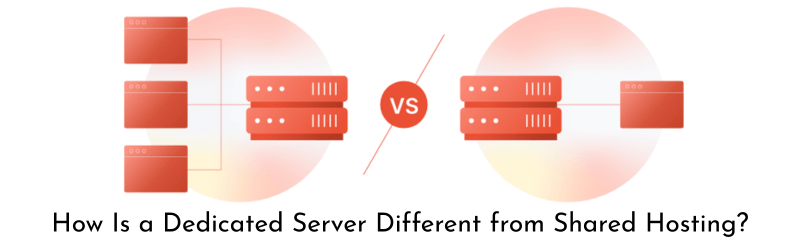
Shared hosting is the most basic type of hosting. In shared hosting, many users host their websites on the same server. This keeps the cost low, but it also means the resources are shared.
If one website on the same server gets high traffic or uses too much CPU, other websites may slow down. You also get limited access and cannot fully customize the server.
A dedicated server is different because the entire server belongs to you. You get more power, better privacy, stronger security, and full customization.
Shared hosting is good for small blogs, portfolio sites, and basic business websites. Dedicated server hosting is better for growing websites, heavy applications, high-traffic platforms, and businesses that cannot afford frequent downtime or slow loading speed.
How Is a Dedicated Server Different from VPS Hosting?
VPS hosting is a middle option between shared hosting and dedicated hosting. In VPS hosting, one physical server is divided into multiple virtual servers. Each VPS gets allocated resources, but the main physical machine is still shared among multiple users.
A dedicated server gives you the complete physical machine. There is no virtualization layer dividing resources among different users. This means better performance consistency, stronger isolation, and more control.
VPS hosting is suitable for medium websites, developers, and small applications. A dedicated server is better when you need high performance hosting, large storage, custom configurations, or predictable resource availability.
Who Should Use a Dedicated Server?
A dedicated server is useful for anyone who needs more power, security, and control than basic hosting can provide.
You should consider dedicated server hosting if:
- Your website receives high traffic
- Your online store has many products and visitors
- Your application needs stable performance
- You need root access to install custom software
- You run multiple websites or client projects
- You need better security and privacy
- Your current hosting is slow or limited
- You require custom server configuration
- You want better uptime and reliability
Businesses that handle customer data, online payments, internal software, or large databases often prefer dedicated servers because they offer more control and stronger performance.
What Are the Main Benefits of a Dedicated Server?
The biggest benefit of a dedicated server is that all resources are exclusively available to you. This improves performance and reduces the risk of slowdowns caused by other users.
Another major benefit is control. You can choose the operating system, control panel, software stack, security tools, firewall settings, and server environment.
A dedicated server also improves privacy because your data is not hosted alongside unknown users. This is important for businesses, agencies, developers, and platforms dealing with sensitive information.
Other benefits include better uptime, stronger security, scalability, dedicated IP addresses, custom software installation, and improved website loading speed.
For serious projects, dedicated hosting gives a strong foundation for long-term growth.

Is a Dedicated Server Good for Beginners?
Yes, beginners can use dedicated servers, but the experience depends on the type of server plan they choose.
If you are new to server management, an unmanaged dedicated server may feel difficult because you need to handle setup, security, updates, backups, and troubleshooting yourself.
A managed dedicated server or a dedicated server with cPanel is a better option for beginners. cPanel makes it easier to manage websites, emails, databases, domains, SSL certificates, FTP accounts, and backups from a simple dashboard.
So, beginners can start with dedicated hosting, but it is better to choose a setup that includes technical support, server management, or a user-friendly control panel.
What Is a Dedicated Server with cPanel?
A dedicated server with cPanel is a dedicated server that comes with cPanel and WHM installed. cPanel is a popular control panel used to manage hosting accounts, websites, emails, databases, files, SSL certificates, and other hosting features.
WHM is used by server administrators to create and manage multiple cPanel accounts. This is especially useful for web hosting companies, agencies, developers, and resellers.
With cPanel, users do not need to run every task through command-line commands. It makes server management more beginner-friendly and organized.
A dedicated server with cPanel is commonly used by businesses that host multiple websites or provide hosting services to their clients.
What Is Root Access in Dedicated Hosting?
Root access means full administrative control over the server. With root access, you can install software, change server settings, configure security rules, create users, manage services, and customize the server environment.
For Linux dedicated servers, root access gives the highest level of control. For Windows dedicated servers, administrator access works in a similar way.
Root access is powerful, but it also comes with responsibility. A wrong command or incorrect setting can affect server performance or security. Beginners should be careful while using root access or choose a managed dedicated server if they are not confident with server administration.

What Is a Bare Metal Server?
A bare metal server is another name often used for a dedicated physical server. It means the server hardware is not shared with other users through virtualization.
In many cases, the terms bare metal server and dedicated server are used almost the same way. Both refer to physical server resources assigned to one customer.
Bare metal servers are popular for high-performance workloads because they provide direct access to hardware resources. They are used for databases, virtualization, AI workloads, game hosting, enterprise applications, and high-traffic websites.
Is a Cheap Dedicated Server Worth It?
A cheap dedicated server can be worth it if it provides the right balance of performance, reliability, and support. However, the lowest price should not be the only deciding factor.
Before buying a cheap dedicated server, check the hardware specifications, CPU generation, RAM, storage type, bandwidth limit, data center location, support quality, backup options, and network uptime.
Some low-cost servers may use older hardware or limited support. That may be fine for testing, development, backups, or small projects. But for production websites, business applications, or eCommerce stores, reliability matters more than saving a small amount every month.
A good cheap dedicated server should still offer stable performance, proper network connectivity, basic security, and upgrade options.
How Much Does Dedicated Server Hosting Cost?
The cost of dedicated server hosting depends on server specifications and management level.
Pricing usually depends on:
- CPU type and number of cores
- RAM capacity
- SSD, NVMe, or HDD storage
- Bandwidth limit
- Data center location
- Operating system
- Control panel license
- Managed or unmanaged support
- Backup service
- DDoS protection
- Additional IP addresses
Entry-level dedicated servers are cheaper and suitable for small workloads. High-end servers with powerful CPUs, NVMe storage, large RAM, and unmetered bandwidth cost more.
If you need cPanel, Windows Server, backup storage, or managed support, the monthly cost may increase.
Which Operating System Is Best for a Dedicated Server?
The best operating system depends on your use case.
A Linux dedicated server is popular for websites, PHP applications, WordPress, Laravel, Node.js, Python, databases, and hosting control panels like cPanel. Linux is stable, secure, and widely used in the hosting industry.
A Windows dedicated server is suitable for applications that require Microsoft technologies such as ASP.NET, MSSQL, Remote Desktop, or Windows-based software.
For most website hosting needs, Linux is usually preferred because it is lightweight, cost-effective, and compatible with popular hosting tools.
Beginners who want cPanel should choose a supported Linux operating system such as AlmaLinux, Rocky Linux, or CloudLinux, depending on the control panel requirements.
How Much RAM Do I Need for a Dedicated Server?
RAM requirement depends on what you plan to host.
A small business website or few WordPress websites may run well with 8 GB to 16 GB RAM. A busy eCommerce store, hosting business, or large database may need 32 GB, 64 GB, or more.
If you are running virtualization, game servers, large applications, or multiple client websites, you should choose higher RAM.
It is always better to estimate based on traffic, number of websites, database size, plugins, software stack, and expected growth. If your project is growing, choose a server that allows easy upgrades.
Which Storage Is Better: HDD, SSD, or NVMe?
Storage plays an important role in server performance.
HDD storage is cheaper and useful for large storage needs, backups, or archives. SSD storage is faster than HDD and improves website loading, database performance, and file access speed.
NVMe storage is even faster than traditional SSD. It is ideal for high-performance websites, eCommerce stores, database-heavy applications, and projects where speed matters.
For modern dedicated server hosting, SSD or NVMe storage is recommended for better performance. HDD can still be useful when you need large storage at a lower cost.
What Is Bandwidth in Dedicated Hosting?
Bandwidth refers to the amount of data transferred between your server and users. Every time someone visits your website, downloads a file, watches a video, or uses your application, bandwidth is consumed.
If your website gets high traffic or serves large files, you need more bandwidth. Some dedicated servers come with fixed monthly bandwidth, while others offer high or unmetered bandwidth.
Unmetered bandwidth does not always mean unlimited speed. It usually means you can transfer data without a fixed monthly usage cap, but the port speed may still be limited.
Always check both bandwidth allowance and network port speed before choosing a server.
Is DDoS Protection Important for Dedicated Servers?
Yes, DDoS protection is important, especially for public websites, gaming servers, SaaS platforms, and businesses that depend on online availability.
A DDoS attack sends heavy fake traffic to your server to make it slow or unavailable. Good DDoS protection helps filter malicious traffic before it affects your website or application.
Even if you are not expecting attacks, basic protection is useful because downtime can affect revenue, reputation, and customer trust.
For business-critical projects, DDoS protection should be considered an important part of server security.

Are Dedicated Servers Secure?
Dedicated servers can be very secure, but security depends on proper setup and maintenance.
Since you are not sharing the server with unknown users, the risk from neighboring accounts is reduced. However, you still need to secure the server properly.
Basic server security includes:
- Strong passwords
- SSH key authentication
- Firewall configuration
- Regular software updates
- Malware scanning
- Backup setup
- SSL certificates
- Limited login access
- DDoS protection
- Monitoring tools
If you are a beginner, managed dedicated server support can help with security hardening and regular maintenance.
Do I Need Backups for a Dedicated Server?
Yes, backups are essential. A dedicated server gives you control, but it does not automatically protect you from accidental deletion, software errors, malware, hardware failure, or database corruption.
You should keep regular backups of website files, databases, emails, and important configurations.
A good backup strategy includes daily or weekly backups, off-server storage, and regular restore testing. Keeping backups on the same server is risky because if the server fails, your backups may also become unavailable.
For important business websites, remote backups are strongly recommended.
Can I Host Multiple Websites on One Dedicated Server?
Yes, you can host multiple websites on a single dedicated server. This is one of the common reasons businesses choose dedicated hosting.
With WHM and cPanel, you can create separate hosting accounts for each website. This makes management easier and keeps websites organized.
Agencies, developers, and hosting resellers often use dedicated servers to host many client websites from one powerful server.
However, the number of websites you can host depends on server resources, website traffic, database usage, email usage, and software requirements.
Can a Dedicated Server Improve Website Speed?
Yes, a dedicated server can improve website speed because your website gets exclusive access to server resources. There is no resource sharing with other users, so performance is more stable.
Speed also depends on website optimization, caching, database structure, image size, CDN usage, and server location.
A dedicated server with SSD or NVMe storage, enough RAM, optimized web server configuration, and proper caching can deliver excellent loading speed.
For high-traffic websites, moving from shared hosting or low-resource VPS hosting to a dedicated server can make a noticeable difference.
Is Managed Dedicated Server Hosting Better?
Managed dedicated server hosting is better for users who do not want to handle technical server tasks themselves.
In managed hosting, the provider may help with server setup, monitoring, updates, security patches, software installation, and troubleshooting. The exact services depend on the provider’s management policy.
Managed hosting is useful for businesses that want performance and control without spending too much time on server administration.
Unmanaged hosting is better for experienced developers, system administrators, or businesses with an in-house technical team.
When Should You Upgrade to a Dedicated Server?
You should consider upgrading to a dedicated server when your current hosting cannot handle your website or application properly.
Common signs include:
- Website loads slowly during peak hours
- Frequent resource limit errors
- Database performance issues
- Need for custom software
- Security or compliance requirements
- High traffic growth
- Frequent downtime
- Need to host multiple websites
- Better email or application performance needed
If your hosting is affecting business performance, customer experience, or revenue, it may be time to upgrade.
Final Thoughts
A dedicated server is a powerful hosting solution for users who need performance, control, security, and reliability. It may look technical at first, but with the right setup, control panel, and support, even beginners can manage dedicated hosting confidently.
Before choosing dedicated server hosting, understand your project needs clearly. Look at CPU, RAM, storage, bandwidth, data center location, control panel, support level, backups, and security features.
A cheap dedicated server can be a good starting point if it offers reliable hardware and network quality. For beginners, a dedicated server with cPanel or managed support can make the journey much easier.
The main goal is simple: choose a server that supports your website today and gives enough room to grow tomorrow.