
Introduction
As we approach 2026, Linux serves as the foundation of the internet. It remains the dominant OS for VPS, dedicated hosting, cloud hosting platforms, and enterprise data center environments for performance, reliability, and flexibility. These advantages also mean that Linux is an attractive target for attackers. Today, attackers leverage AI-based botnets, automated attack scripts, and vulnerability scanners that continuously scan Linux servers for outdated software, open and/or misconfigured ports, poor authentication, and unpatched vulnerabilities. Your Linux server could completely compromise with a missed package version or one overlooked setting.
In light of the increased threats to your Linux server, the act of securing a Linux server is no longer a “once in a while” or straightforward task. You must devote sustained attention on an ongoing basis, advancing the server administrator role to one associated with monitoring in a proactive way, and configuring a hyper-hardened security posture. You, the server administrator, are now the guardian of Uptime, Customer Data, & Host Environment Longevity. This guide identifies the most applicable Linux server security practices for 2026 and how VPS Owners and hosting teams can put these practices into action and build a strong and resilient infrastructure.

Keep Your Linux Server Updated
Keeping your server up to date is one of the most straightforward but powerful defenses. Every year, many vulnerabilities are found in popular components such as the Linux kernel, OpenSSH, Apache, NGINX, MySQL, PHP, Python, and Node.js. Vulnerabilities are found and attacked in obsolete servers as unpatched servers have many other security vulnerabilities left unprotected for an attacker to exploit. If an attacker exploits a known vulnerability, they can remotely access a server, install malicious software, take control of the server’s resources, or access previously stored customer information./
Using apt or dnf, periodically updating your linux distribution keeps your server patched against relevant vulnerabilities. Many administrators in hosting environments where uptime is important use unattended upgrades to install crucial patches automatically. Full stack updates also should be part of this process. Web servers, database systems, container engines, CMS platforms, and hosting control panels also need relevant updates. Once your full stack is updated and patched, it becomes much less likely that a low-hanging fruit exists for an attacker. A fully patched and updated server is one of the best foundations for a secure hosting environment.
Harden SSH Access
SSH is the primary entry point for access to a Linux server, and hardening it is one of the biggest steps to mitigate vulnerability. On many hosting servers, operators still use password-based authentication, which is one of the simplest forms of authentication for attackers to crack through brute force. Transitioning to SSH key-based authentication provides a substantial increase in security, as keys are virtually impossible to crack or brute force. Once authentication via key is enabled, the act of completely disabling password logins eliminates one of the largest chance points for a malicious person to gain unauthorized access.
Another crucial step is to disable remote root login. Once root login is disabled, attackers lose access to the most privileged account on the server. Instead, administrators create a normal user account and can temporarily elevate privileges with the sudo command. Changing the default SSH port from port 22 to another port can help eliminate IP scanners and automated bots, as they only scan the default ports. Software such as Fail2ban offer additional support by simply blocking an IP after an excessive amount of failed logins.
As of 2026, many organizations have adopted, also known as, “two factor” authentication via SSH, usually by combining the key based authentication with a time-based one time password. This creates a significant barrier to unauthorized access. When you employ all of these practices together — key authentication, disallowing root login, changing the default port, Fail2ban, and, optionally, two-factor authentication — your SSH access is now exceptionally hardened and far more difficult for attackers to compromise.
Firewall and Network Security
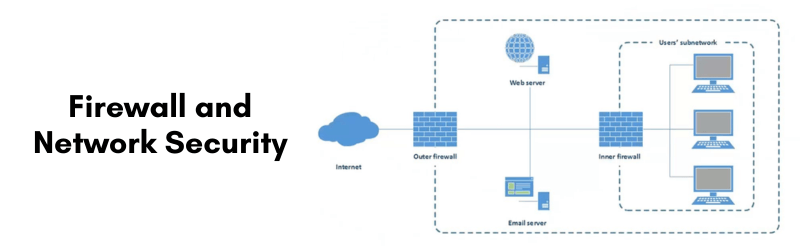
Having a properly configured firewall is one of the best defenses in a Linux hosting environment. Firewalls are used to determine which connections are to be allowed to reach the server and which ones are to be denied. Utilizing UFW, FirewallD or NFTables, administrators can specify exactly which ports and services to allow traffic for. For a secure hosting server, all ports should be closed except for the essential ones: the ones for HTTP (80), HTTPS (443) and their own designated SSH port. By closing unused ports, the attack surface is minimized, and any unauthorized access attempts are prevented.
Cloud hosting vendors also offer their own network-based firewalls and/or security filtering capabilities that block malicious traffic before it even reaches the server. These external firewalls often also include anti-DDoS capabilities to protect against automated attacks at scale. Layering this with a local server-related firewall is an excellent way to build out strong network security. Rate limiting and similar connection throttling also helps in preventing repeated login attempts or scanning capabilities from bots.
Network security also includes disabling unnecessary services, DNS hygiene and ensuring traffic is forced to SSL/TLS for secure communications. A server with proper firewall rules and site clean-ups in place will be more resilient to intrusion on the server, especially in a world where automated bots continuously scan hosting environments for vulnerabilities.
Monitoring and Intrusion Detection
Although SSH is properly secured and firewall settings are implemented, no Linux server can be fully secure without the capacity for monitoring. There are still attempts to exploit application vulnerabilities, perform privilege escalation, or execute a backdoor (script). Without monitoring assistance, any malicious behaviors may go unnoticed until the damage has been done.
Intrusion detection systems capable of analyzing the logs of a system and detecting suspicious behavior (i.e. modifying logs) include OSSEC, Wazuh, and Lynis. Good intrusion detection systems will notify the administrator of unauthorized access from unknown logins, changes to sensitive files, unexpected processes, or abnormal network traffic. File integrity monitoring tools (i.e. AIDE) compare certain essential system files with a known good version, and notify administrators if there is a change to their original state. These tools are especially important because serious attacks typically rely on modified system binaries, or otherwise injecting malicious payloads.
Log auditing can provide further insight by reporting who accessed the server, normalized down to the command they ran, and what actions may draw suspicion. Hosting environments also see those unexpected jumps in CPU and/or memory high usage when a site is under attack or compromised, so resource usage monitoring is important. As of 2026, being aware of real-time monitoring is a common expectation, so the administrator has the potential to respond before small problems become full-fledged incidents.
User Access and Privilege Management
Effective user access management is a significant factor in Linux security. Increasing access to users that do not need it increases the chances of abuse, especially in hosting that is shared or team-based. The principle of least privilege helps to ensure that users are only granted the access they need for their role, and this greatly reduces access to accidental or unauthorized changes.
Using sudo to give better control of users instead of giving users full root access gives you better control and liability. Actions taken with sudo can be logged, which provides an audit trail of what commands the user executed. Any time an account is not being used, it should be disabled for further access immediately after it is no longer needed. In many cases, the habit of deactivating or disallowing access commands/credentials is typically dismissed as active accounts will go unchecked — however, if I am not using an account, and it is not deactivated, in many situations, it is an easy target. A clean and up-to-date user access list is vital for extensive or multi-client hosting usages.
Even with SSH keys, additional server tools — such as MySQL, cPanel, phpMyAdmin, or email panels — require passwords. Securing password policy controls to require complexity, limit login attempts, and provide these controls usability in a timely fashion to their users will help protect users and accounts against password-oriented attacks. Through proper privilege management and ensuring passwords are secured with controls, the potential for risk, within the system and externally, is severely minimized.

Web Hosting and Application Security
In today’s threat landscape, the focus of most attacks is on applications running on Linux servers rather than the operating system. Because of this, web hosting security is a primary defense in hardening servers. Apache and NGINX should be configured to mask version numbers, disable directory listing options, eliminate information leakage, and redirect all traffic through HTTPS. Strong SSL/TLS certificates secure the data that’s sent from the server to the community.
PHP configurations deserve extra caution in a hosting scenario. Disabling dangerous functions, limiting upload capabilities, restricting access to critical folders, and masking errors can help reduce exploitation. Other critical technologies, such as securing the database, can also be protective. Limiting remote database access, providing strong credentials, only offering minimum privileges, and enabling authentication can thwart attacker attempts to exploit database vulnerabilities.
Content Management Systems (CMS) such as WordPress, Joomla, and Magento are commonly exploited due to the fact that these platforms rely upon the continued updates of the plugins and themes that are running. Because of this, it is very important to audit the code weekly, initiate malware scans frequently, and manage your security plugins often. Given the trend in hosting environments toward containerization, it’s just as important to protect anything that’s on a Docker or Kubernetes-based environment. Starting with a trusted base image, only running trusted images, and other network hardening options are just as valuable in assuring your containerized application is protected from current threat vectors.
Backup and Recovery Strategy
Regardless of your server’s security measures, no server can be guaranteed to be risk-free. Therefore, backups are your last and most trustworthy safety net. Having a robust backup strategy in place will help you reset quickly after a ransomware attack, inadvertent deletion, data corruption, or even just a bad system failure. The 3-2-1 rule (3 copies, 2 different types of media, 1 offsite) will keep your data as durable as possible.
Utilizing solutions like Rsync, Rclone, BorgBackup, or even cloud backup services can help automate most of the process to ensure that your files, databases, and configurations are consistently and regularly backed up. Most hosting control panels also have their own built-in backup systems with some level of restoration built within. As attacks from ransomware and application failures continue to rise, disaster recovery has become a necessity for any and all hosting providers. Regardless of your unexpected issues, with consistent, operating backups in place, you can restore your Linux hosting environment in way less than an hour.
Conclusion
In 2026, securing a Linux server can be accomplished utilizing a multi-layered security paradigm consisting of operating system updates/new kernel installation/rebooting, hardening SSH, configuring services firewalls, real time monitoring, filesystem permissions, website security, and redundant backups of site data. In conjunction with one another, each layer will fortify your server/OS environment as cyber security attacks become further automated and advanced. As server or VPS owners migrate their site/server to either a VPS, dedicated server, or cloud hosting platform, following best practices will help ensure long-term server stability, increased uptime and network trustworthiness from users that depend on the always ready “hosting” environment.