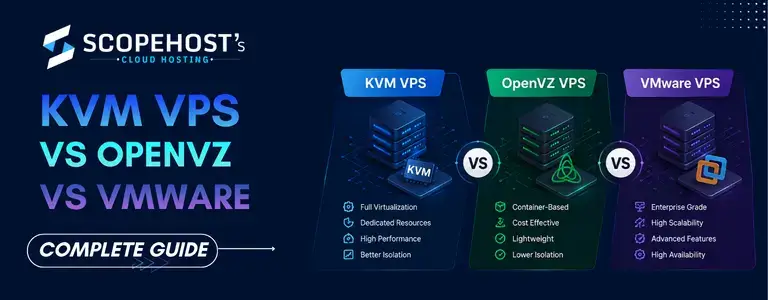
KVM vs OpenVZ vs VMware: Which VPS Virtualization Technology Is Best?
When you are buying or maintaining a VPS server, the selection of virtualization technology is one of the most crucial things you will do. Whether you are hosting websites, running commercial applications, installing game servers or managing development environments, the virtualization platform directly influences the performance, scalability, security and resource allocation.
There are three main types of virtualization technology, which are covered today: KVM VPS, OpenVZ VPS and VMware virtualization. They all have their own architecture, pros, cons and ideal use cases.
In this post we will be discussing KVM vs OpenVZ vs VMware in detail to help you understand which virtualization technology meets your requirements the best.
What is Virtualization?
Virtualization is the process of dividing a physical server into multiple isolated virtual servers. Each virtual server can operate independently with its own operating system, allocated resources, applications, and configurations.
Virtualization technology allows hosting providers and businesses to maximize hardware efficiency while offering flexible and scalable server environments.
The most commonly used VPS virtualization technologies include:
- KVM Virtualization
- OpenVZ Virtualization
- VMware Virtualization
What is KVM VPS?
KVM (Kernel-based Virtual Machine) is a full virtualization technology built directly into the Linux kernel. It transforms a physical server into a hypervisor capable of running multiple isolated virtual machines.
With KVM VPS hosting, each virtual server gets:
- Dedicated CPU allocation
- Dedicated RAM
- Dedicated storage
- Independent kernel
- Full root access
- Operating system flexibility

Advantages of KVM VPS
1. Full Isolation
Each KVM virtual machine operates independently from others on the same node. If another VPS experiences heavy load or crashes, your server remains unaffected.
2. Dedicated Resources
KVM virtualization allocates dedicated server resources, reducing the risk of resource abuse by neighboring VPS instances.
3. Custom Kernel Support
Users can install custom kernels, firewall modules, Docker environments, and advanced applications without restrictions.
4. Multiple Operating Systems
KVM supports:
- Linux distributions
- Windows Server
- Custom ISO installations
- Specialized operating systems
5. Better Security
Strong isolation improves security and minimizes vulnerabilities caused by shared environments.
Limitations of KVM VPS
- Slightly higher resource usage
- More expensive than lightweight container virtualization
- Requires stronger hardware infrastructure
What is OpenVZ VPS?
OpenVZ is a container-based virtualization system for running numerous isolated containers on a single Linux kernel.
OpenVZ does not provide full hardware virtualization as KVM does. Instead, all the VPS containers use a single host kernel.

Advantages of OpenVZ VPS
1. Lower Resource Consumption
Because containers share the same kernel, OpenVZ uses fewer system resources.
2. Cost Effective
OpenVZ VPS hosting is generally more affordable than KVM VPS solutions.
3. Fast Deployment
Containers can be created and deployed quickly.
4. Better Density
Hosting providers can run more VPS containers on a single physical server.
Limitations of OpenVZ VPS
1. Shared Kernel
All VPS instances use the same Linux kernel. This limits customization and compatibility.
2. Linux Only
OpenVZ does not support Windows operating systems.
3. Reduced Isolation
Because containers share resources at the kernel level, noisy neighbor issues may occur.
4. Limited Customization
Advanced kernel modules and certain applications may not work properly.
What is VMware Virtualization?
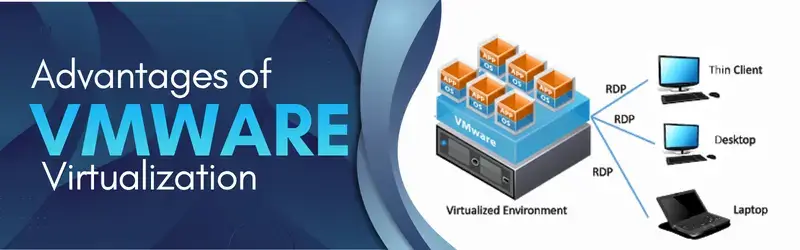
VMware is a well-known enterprise-grade virtualization platform that is often utilized in corporate IT environments, data centers and private cloud architecture.
VMware offers better administration of virtualization, high availability characteristics, and excellent infrastructure reliability.
It is commonly used by:
- Large enterprises
- Corporate environments
- Cloud infrastructure providers
- Virtual desktop environments
- Mission-critical applications
Advantages of VMware Virtualization
1. Enterprise Stability
VMware is known for reliability and mature virtualization management.
2. Advanced Features
VMware supports:
- Live migration
- Snapshots
- High availability
- Disaster recovery
- Automated resource balancing
3. Strong Performance
Well-optimized virtualization delivers stable performance for enterprise workloads.
4. Professional Management Tools
VMware offers centralized management through tools like vCenter.
Limitations of VMware
1. Higher Licensing Cost
VMware licensing can significantly increase infrastructure expenses.
2. Complexity
VMware environments often require experienced administrators.
3. Higher Operational Overhead
Resource requirements and infrastructure costs are generally higher.
KVM VPS vs OpenVZ vs VMware: Major Differences
1. Virtualization Type
| Technology | Type |
|---|---|
| KVM | Full Virtualization |
| OpenVZ | Container Virtualization |
| VMware | Enterprise Hypervisor |
2. Performance
KVM VPS offers great performance, dedicated resources and isolation. OpenVZ performs well for lightweight applications but can experience resource contention under severe load.
3. Resource Isolation
KVM and VMware are more isolating than OpenVZ. OpenVZ containers share a common kernel and this occasionally might lead to performance discrepancies.
4. Operating System Support
| Technology | Linux | Windows |
|---|---|---|
| KVM | Yes | Yes |
| OpenVZ | Yes | No |
| VMware | Yes | Yes |
5. Security
KVM and VMware provide better isolation and security because each VPS operates independently.
6. Scalability
VMware excels in enterprise scalability and advanced infrastructure management.
KVM provides excellent scalability for hosting providers, developers, and growing businesses.
Which Virtualization Technology is Best for Different Use Cases?
Choose KVM VPS If:
- You need dedicated resources
- You require strong security
- You want better isolation
- You need Windows VPS hosting
- You plan to run Docker or custom applications
- You host business-critical websites
- You want better long-term scalability
Choose OpenVZ If:
- You need a low-cost VPS
- Your workloads are lightweight
- You only require Linux hosting
- You prioritize resource efficiency
- You are running simple applications or test environments
Choose VMware If:
- You operate enterprise infrastructure
- You need advanced virtualization management
- High availability is critical
- You require disaster recovery features
- You manage large corporate environments
- You need enterprise-grade support and integration
Is KVM Better Than OpenVZ?
In most modern hosting environments, KVM virtualization is generally preferred over OpenVZ because it offers:
- Better isolation
- Dedicated resources
- Stronger security
- Windows support
- Improved customization
- More stable performance
Is VMware Better Than KVM?
VMware offers more advanced enterprise management features, but KVM has become extremely popular because of its:
- Open-source ecosystem
- Lower licensing cost
- Strong performance
- Flexibility
- Scalability
For many businesses and hosting environments, KVM VPS hosting delivers an excellent balance of performance and cost efficiency.
Final Thoughts
The choice between KVM VPS, OpenVZ VPS and VMware is totally dependent on your technical needs, price, scalability objective and workload type.
If you want a modern VPS environment on dedicated resources with robust isolation, flexibility and consistent performance, KVM virtualization is frequently the way to go.
If you’re searching for cheap Linux container hosting for lightweight apps, OpenVZ can still be a feasible choice.
For those seeking enterprise-grade infrastructure, powerful virtualization administration, and high-availability, VMware is still one of the top solutions in the business.
Before selecting any virtualization technology, carefully evaluate:
- Performance requirements
- Resource usage
- Operating system compatibility
- Security needs
- Scalability expectations
- Budget considerations
Understanding these differences will help you choose the right VPS virtualization technology for long-term stability and performance.